


After long stretches at the desk, the way a workspace supports your posture starts to matter more than how it looks in photos.
I notice that my shoulders tighten up when the monitor sits too low or the chair lacks proper back support.
In my own office, swapping out the default chair for one with adjustable arms changed how my elbows rested during typing marathons.
Layout choices like keeping frequently used items within easy reach also play a bigger role than most people expect.
Some of these ideas seem worth trying out in stages to see what fits the way you actually work.
Keep Essentials Within Reach with a Pegboard Wall

A pegboard wall behind the desk turns vertical space into useful storage without crowding the work surface. This setup lets you hang headphones, notes, and small tools right where you need them, which helps reduce reaching and keeps your posture more consistent during long hours.
It works best in smaller rooms or any space where floor area is limited. Mount the pegboard at seated eye level so frequently used items stay easy to grab, and pair it with a simple floating desk to maintain legroom underneath.
Choose a Chair Built for Long Hours

An ergonomic chair is one of the simplest upgrades that actually helps when you sit for most of the day. It keeps your back supported and lets you adjust the height so your feet rest flat and your arms stay level with the desk.
Look for adjustable armrests and solid lumbar support rather than extra padding. This kind of chair fits easily into most home offices and pairs well with a basic desk and monitor setup.
Wrap Your Desk Around a Bay Window
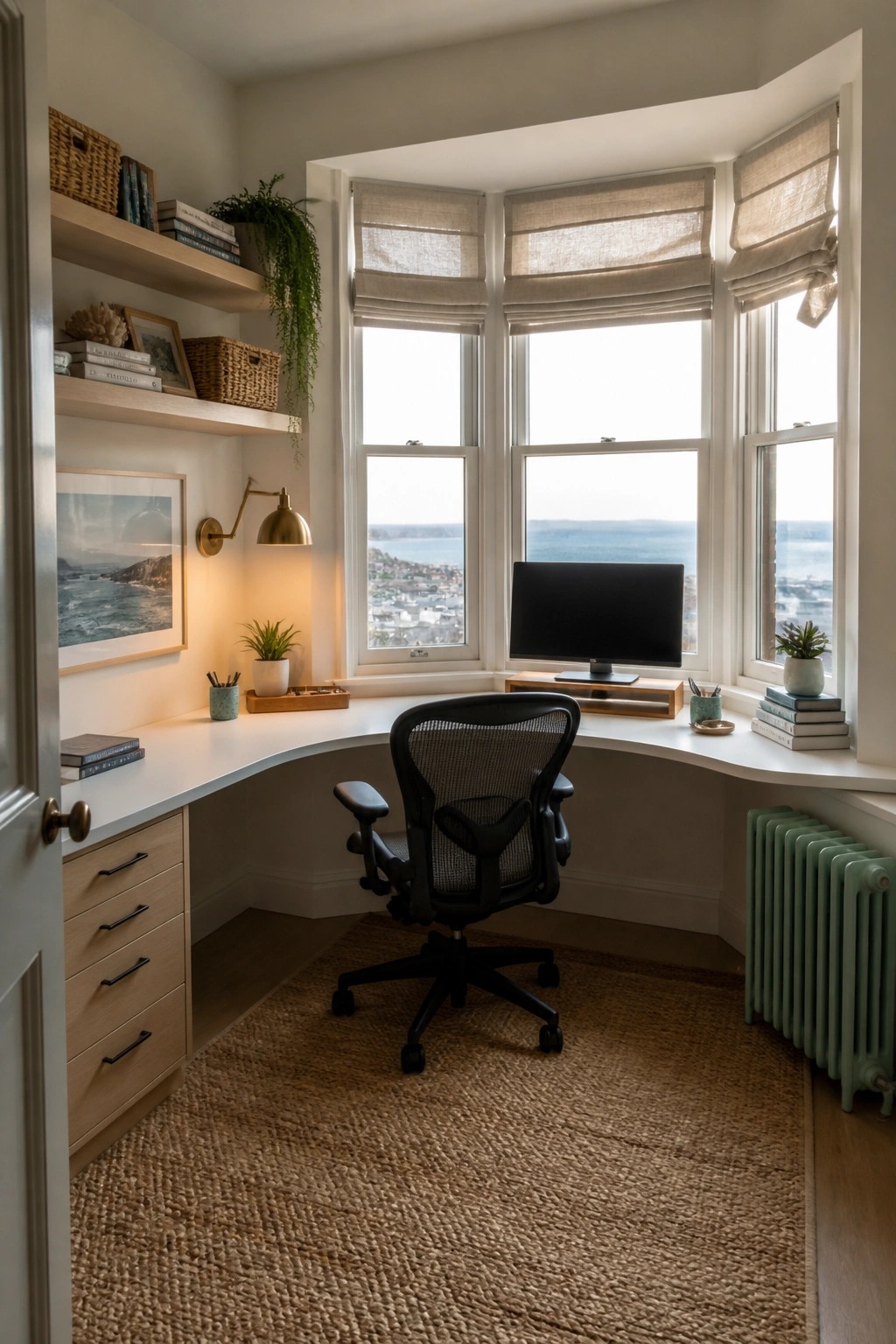
A wraparound desk follows the shape of a bay window and gives you a wide work surface without crowding the room. Sitting in the center means you face straight ahead with natural light coming from both sides, which helps reduce eye strain and neck tension over long hours.
This setup works well in smaller rooms or corners where a straight desk would feel cramped. Keep the chair height adjustable and leave enough space behind it for easy movement. Avoid overloading the desk surface so you can keep your keyboard and monitor at the right level.
Pick a Rolling Chair With Good Back Support

A basic rolling chair makes a big difference when you sit for long stretches. It lets you shift position without getting up, and a decent backrest keeps your posture from slumping after a few hours. In a small room this also helps you reach the sides of the desk without straining.
Place the chair so the seat height lines up with your desk and the monitor sits at eye level. Add a mat underneath if you have hard floors, and keep the area around the base clear so the wheels move freely. This setup works in almost any spare room or corner that already has a simple desk.
Adjustable Desks Support Longer Work Sessions
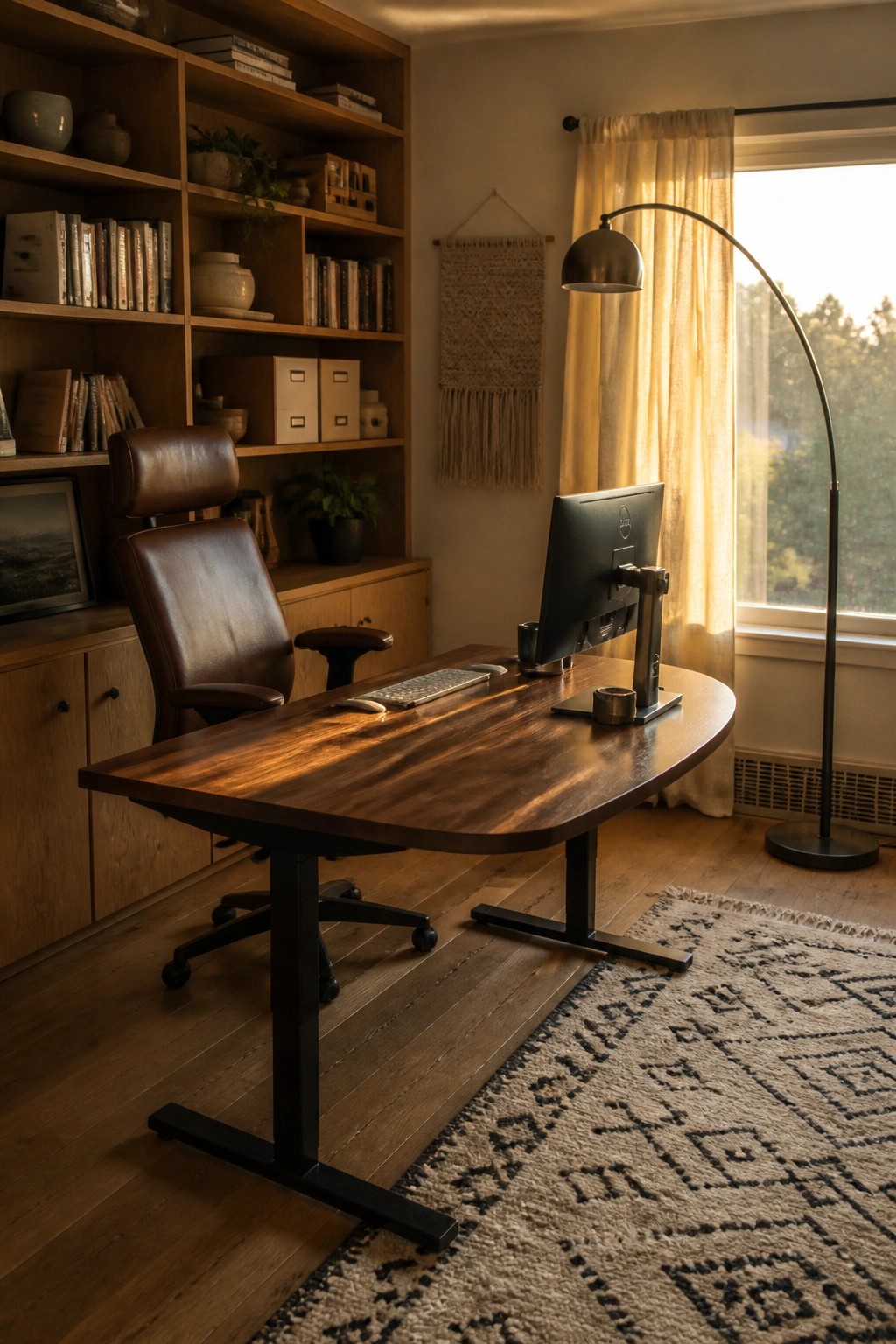
An adjustable desk lets you change positions throughout the day without breaking your focus. The height options reduce strain on your back and neck when you need to stay at the desk for hours.
This works best in a home office where space is limited and you want one piece of furniture to handle both sitting and standing. Pair it with a supportive chair and keep the monitor at eye level so the setup stays practical over time.
Turn a Small Closet into a Focused Desk Area

A small enclosed space like a closet can actually help with long desk hours. It keeps the workspace separate from the rest of the home, which cuts down on visual distractions and makes it easier to stay seated and working. The tight walls also give a natural boundary that helps the room feel more contained and calm.
This setup works best in homes where square footage is limited or where a full room is not available. Mount the monitors on arms so they sit at the right height, add a supportive chair, and use a simple runner on the floor to make the area feel finished. Keep the door open during the day for airflow and close it at the end of work to separate the space from the rest of the house.
Build a Desk That Gives You Room to Work

A built-in desk like this one creates a steady, uninterrupted surface that stays comfortable even after many hours. The fixed height lines up well with an ergonomic chair, and the extra depth keeps your keyboard, mouse, and papers from crowding each other.
This approach works best in a spare room or corner you can dedicate to work. Measure twice so the desk sits at the right height for your chair, and leave enough knee room underneath for easy movement.
Pick An Upholstered Chair For Desk Comfort
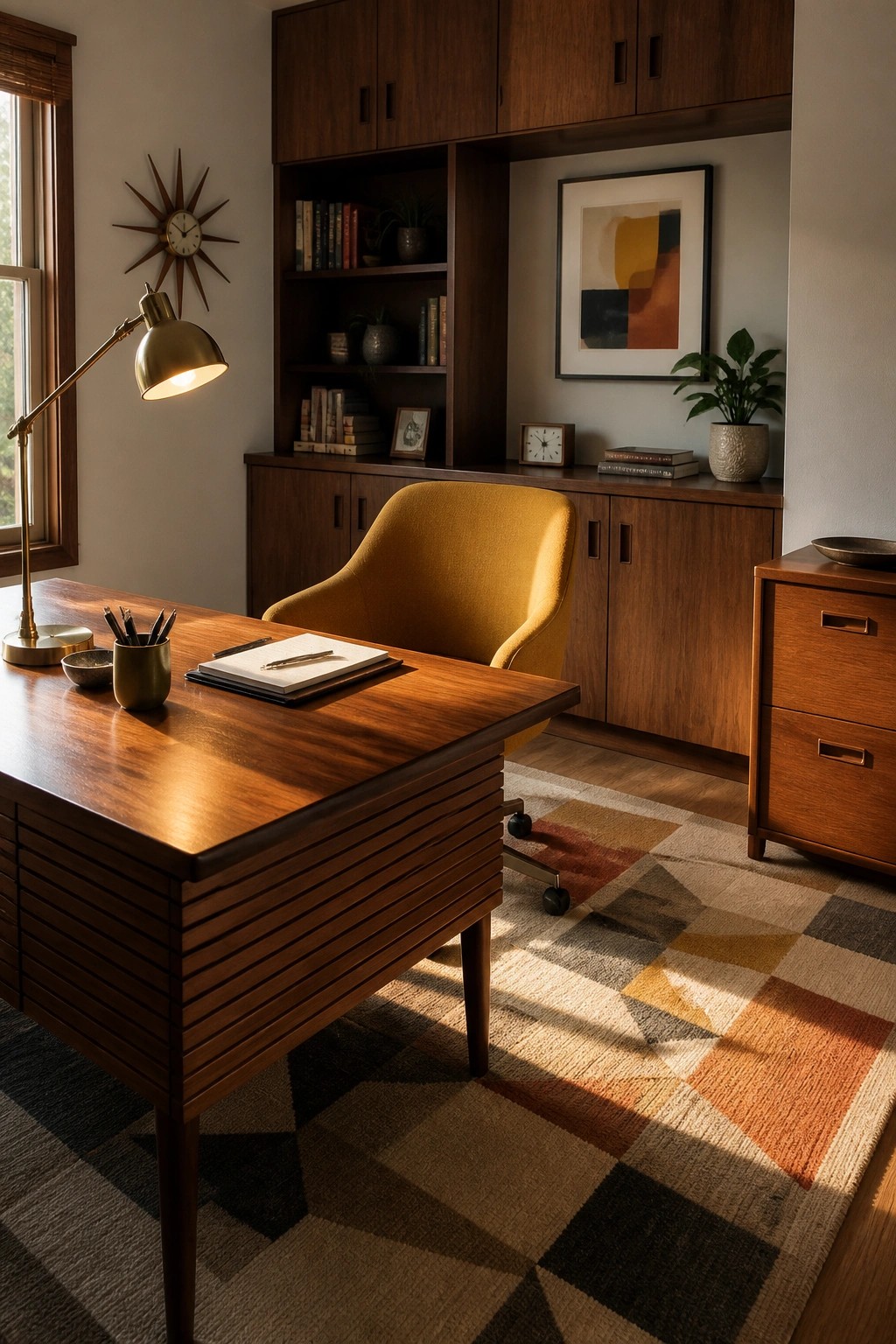
A chair with some padding and a bit of give makes a real difference when you are stuck at the desk for hours. The soft seat and back keep you from shifting around too much or ending up stiff by midafternoon.
Look for one on wheels so you can reach files or the printer without standing up every time. It works well in most home offices as long as the seat height lines up with your desk and the back gives decent support.
Built-In Shelving With A Rolling Ladder

Many home offices lose valuable desk space to stacks of files and supplies. A full wall of built-in shelves paired with a rolling ladder keeps everything stored neatly above the work area so the desk stays clear for long hours of use.
This approach suits rooms with tall ceilings or limited floor space. Place everyday items on lower shelves and less-used supplies higher up, then rely on the ladder to reach them without adding extra furniture that would crowd the room.
A Comfortable Chair for Long Desk Sessions

A supportive chair matters more than most people realize when work stretches into long hours. The right one keeps your back from aching and helps you stay focused without constant shifting or slouching.
Look for something with good padding and a solid backrest that fits the way you sit. It works especially well in a home office that already has a large desk and plenty of nearby storage so everything stays within reach.
Try a Wall-Mounted Desk
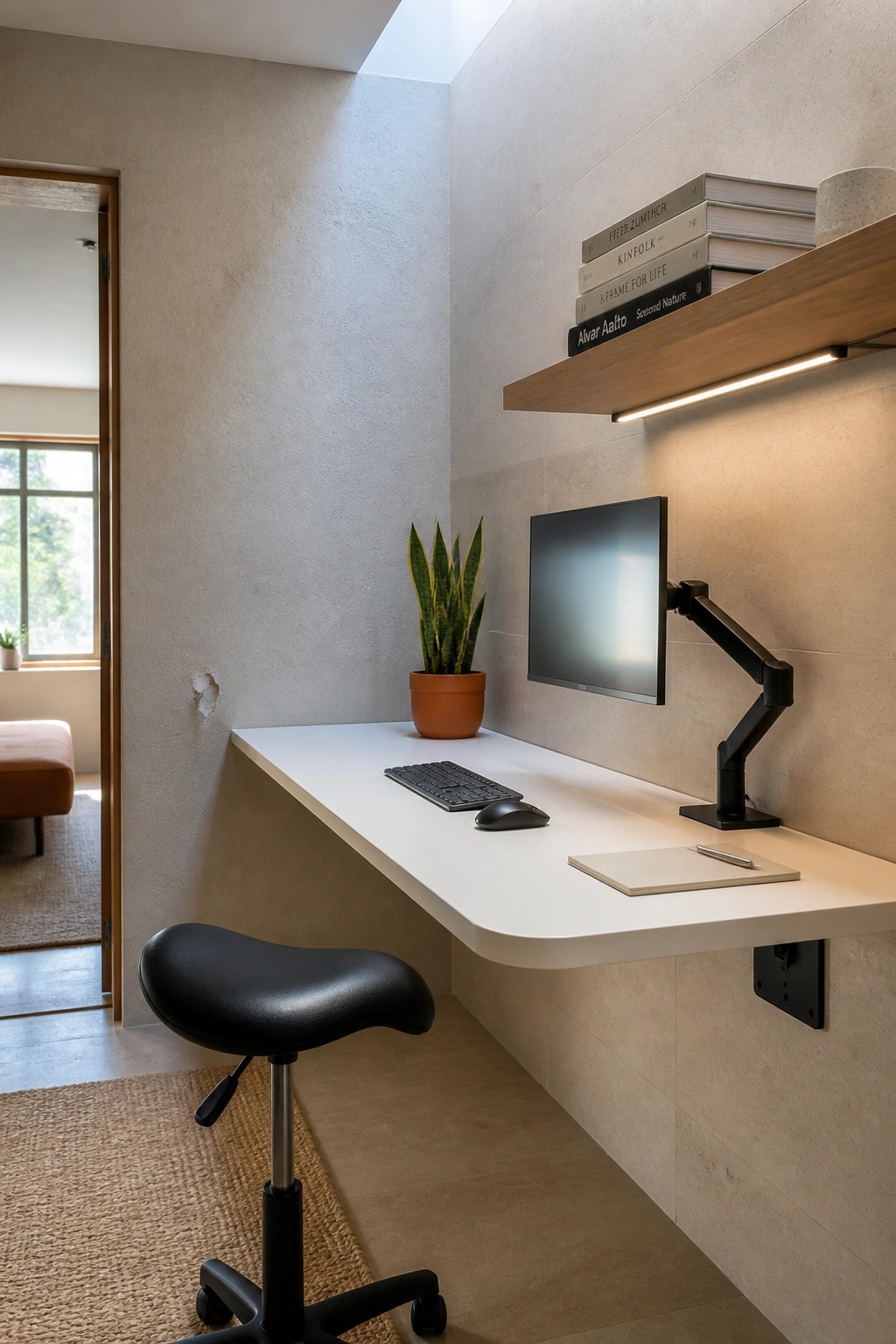
A wall-mounted desk keeps the floor clear so your chair can move freely and the room feels less crowded. This setup works well for long hours because it lets you create a simple, focused workspace without extra furniture legs in the way.
It suits smaller rooms or narrow spaces where a standard desk would feel bulky. Pair it with a monitor arm to set the screen at the right height and leave more surface area free for your keyboard and mouse.
Choose an Ergonomic Chair That Actually Fits the Room

An ergonomic chair makes the biggest difference when you sit for long stretches. It keeps your back supported, lets you adjust the height easily, and rolls smoothly across the floor so you can shift position without strain.
Look for a simple mesh style with solid armrests and lumbar support. It works especially well in smaller offices where the chair needs to move freely without crowding the desk or shelves.
Choose an Ergonomic Chair for Long Work Sessions
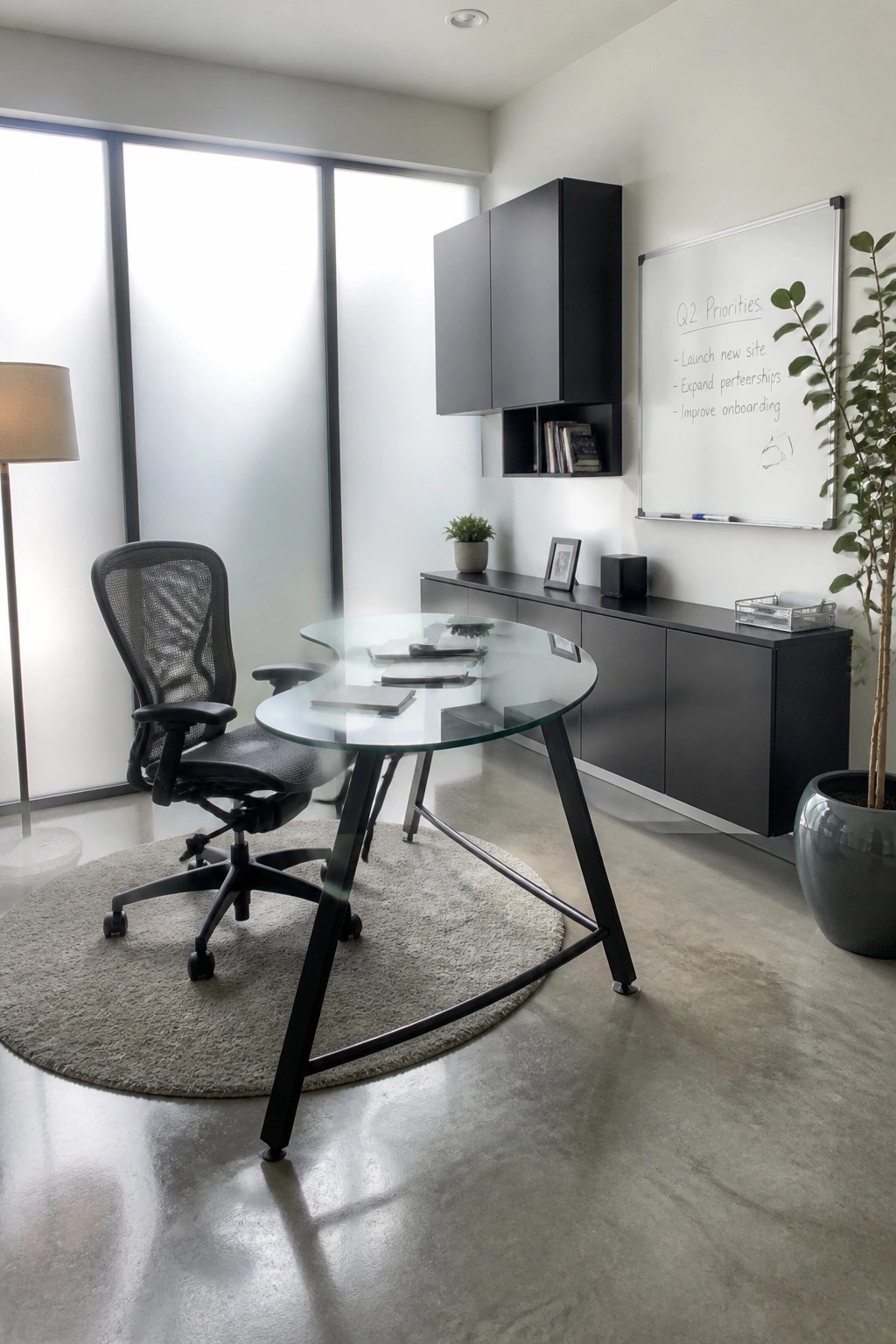
A supportive chair makes the biggest difference when you spend hours at a desk. The mesh back and adjustable seat let you stay comfortable without slouching or shifting around every few minutes.
Look for one with good lumbar support and armrests that line up with your desk height. It works best in a quiet room where you can roll it back easily and keep the area around it clear.
Choose a Chair That Supports Long Hours

A good chair changes how a desk feels after several hours. This one uses a padded leather seat, curved back, and armrests that let you keep your elbows at a natural height without tensing up.
Set the chair on a flat rug so it rolls easily, and adjust the height until your feet rest on the floor. It works in any room where the desk faces a window, since the steady natural light reduces eye strain while the chair handles the rest.
Wrap a Desk Around a Corner for More Workspace

An L-shaped desk makes good use of tight or angled spaces by giving you two long surfaces instead of one. This layout keeps your laptop, papers, and supplies within easy reach, which helps reduce twisting and leaning during long work sessions.
It works best in attic rooms or small spare bedrooms where straight desks would leave wasted space along the walls. Keep a supportive chair in the center and add a task lamp on one side so the lighting stays even as you move between tasks.
Choose an Ergonomic Chair Built for Long Hours

A supportive chair makes the biggest difference when you spend most of the day at a desk. The mesh back and adjustable height let you sit comfortably without slouching, which helps prevent the usual aches that come from cheap seating.
Look for one with good lumbar support and breathable material so it stays comfortable even after several hours. It works especially well in a compact office where the chair becomes the main piece of furniture you interact with all day.
Adjustable Standing Desks for Long Hours

Many people notice they feel less stiff after several hours when they can switch between sitting and standing throughout the day. An adjustable desk makes that change simple without needing to rearrange the whole room.
Add a cushioned mat underfoot and keep a low stool nearby for quick breaks from standing. This approach works best in smaller home offices where the focus stays on comfort rather than filling the space with extra furniture.
Choose a Supportive Chair for Long Hours

A chair with a solid wood frame and woven seat can make a real difference when you spend hours at the desk. The natural materials breathe better than upholstered options, and the curved backrest gives just enough support without forcing you into one position all day. Many people find this style less tiring than fully cushioned seats that eventually sag.
Place it in a quiet corner with good natural light if you can. Keep the rest of the desk surface fairly clear so you are not twisting to reach things. This setup works especially well in smaller rooms where you want comfort without adding bulk.
Frequently Asked Questions
Q: How high should my monitor sit so my neck stays relaxed? A: Set the top edge right at or just below eye level when you sit back in your chair. Look straight ahead and see if the center of the screen falls in your natural gaze without any chin tilt. Move it around until that feels effortless for hours at a time.
Q: My feet keep dangling even after I fix the chair height. What helps? A: Grab a low box or footrest to keep them flat and supported. This lines up your thighs with the floor and stops your back from rounding forward. Check the angle once you settle in and adjust until your knees feel loose.
Q: How do I remember to move when I get deep into work? A: Set a simple timer on your phone for every hour and stand up to stretch or walk a quick lap. Focus on one stretch for your shoulders or hips each time rather than a full routine. The break keeps stiffness from building without needing extra tools.
